The write_share option permits multiple Avanti processes on the same Windows host to open one image file for writing. It changes only the host file-sharing mode; it does not provide cluster coordination, locking, cache coherency, or protection against guest filesystem corruption. Use it only when the guest systems are correctly configured members of a cluster that supports concurrent access to that disk. See SCSI Disk [+].
Warning: Using the write_share feature to share disks with non-clustered Avanti instances is not recommended. Doing so may result in disk corruption.
Historical field guidance used host-shared physical devices, such as SAN disks, when cluster members ran on separate hosts. No representative cross-host SAN configuration has been revalidated for Avanti 5.1.0. Validate device ownership, Windows access semantics, guest clustering, and failure recovery for the exact storage path.
For a same-host image-file experiment, point each participating Avanti configuration at the exact same image and enable write_share for that disk. This is not by itself a supported cluster design; first preserve a backup and validate the complete guest cluster and recovery procedure.
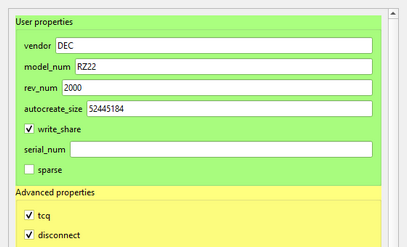
Historical example: an OpenVMS 8.3 cluster shared a system disk and quorum disk stored in VMS83_Clustering.img and V83_Quorum.img. The image shows write_share and TCQ enabled on the quorum disk. This captured example has not been reproduced for Avanti 5.1.0 and does not establish that the same options are correct for every OpenVMS release or storage design.
