Selecting the Physical port option permits a physical COM port on the host server to be assigned to a virtual Alpha system. Physical serial ports require license units.
device
Select or enter the host COM device in the physical-port selector, for example \\.\COM1 or \\.\COM10. There is no default device. Avanti opens it for exclusive read/write access: another application or emulator cannot use that same COM port simultaneously. The host account must be able to open the device.
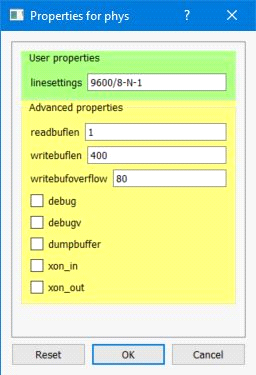
The [+] button beside the physical-port selector opens the ext_serial settings below. They are separate from the emulated port's incoming-buffer settings. Configure these host settings before starting Avanti; guest UART baud-rate changes do not reconfigure the physical COM port.
linesettings (default: 9600/8-N-1)
Use baud/data-parity-stop, without spaces. For example, 9600/8-N-1 selects 9600 baud, eight data bits, no parity and one stop bit. Accepted baud rates are 110, 300, 600, 1200, 2400, 4800, 9600, 14400, 19200, 38400, 57600, 115200, 128000 and 256000. Data bits are 5 through 8; parity is N (none), O (odd), E (even), M (mark) or S (space); stop bits are 1, 1.5 or 2. Only five data bits allow 1.5 stop bits, and five data bits cannot use two stop bits. The Windows driver and attached hardware must also support the selected combination.
The value host preserves the current host baud/data/parity/stop settings. It does not leave every COM option unchanged: Avanti still applies its xon_in and xon_out settings and its I/O error/timeout policy. The value guest is not implemented. That value, incomplete or malformed settings, and unsupported combinations produce diagnostics and retain the host line settings rather than applying the requested format; check the startup log for the actual configured settings. Enter line settings in the complete documented format, and keep both ends of the connection consistent.
xon_in and xon_out (both default: false)
xon_in enables Windows-driver receive flow control: the driver sends XOFF/XON to ask the attached device to stop/resume sending input. xon_out enables transmit flow control: XOFF/XON received from the attached device pauses/resumes output to that device. These directions are relative to the host COM port. They use the driver's existing control characters and receive thresholds, not Avanti's buffer-size values. Enable them only when the peer uses compatible software flow control; these characters can otherwise interfere with binary protocols. These options do not configure RTS/CTS or DTR/DSR hardware flow control.
writebuflen (default: 400; range: 10 through 10000)
writebufoverflow (default: 80; range: 5 through 10000)
These byte counts are added together to size each of two Avanti output buffers; the defaults give 480 bytes per buffer. One buffer can be written while the other collects output. The two settings are not independent pause/resume thresholds, and neither changes the Windows driver's queue sizes. Excess output can still produce a physical serial port output buffer overflow and data loss; increasing buffer sizes is not a guarantee against a stalled receiver. Leave the defaults unless investigating a specific workload.
debug and debugv (both default: false)
debug enables additional physical-port diagnostic messages in the emulator log. debugv independently enables the verbose diagnostic call sites; it does not require debug to be true. Neither is a complete serial byte transcript. Logging can add substantial volume and overhead; use it temporarily for diagnosis. Normal startup and error messages may appear with both settings false.
Legacy controls: readbuflen and dumpbuffer
These remain visible for compatibility, but do not provide the behavior their old descriptions suggested. readbuflen (default 1, range 1 through 15) is validated and stored but is not used by the current physical read loop. dumpbuffer (default false) has no active buffer-dump call site. Leave both at their defaults; do not use them to tune read latency or capture serial data.
