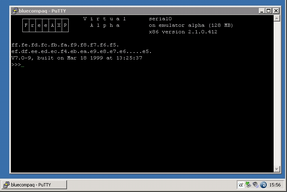
Avanti can be launched interactively from the Configuration Utility using the Run button, or from a command line. Avanti can also be run as a Windows service, which is covered in Installing Avanti as a Service. Launching Avanti is equivalent to powering up a real Alpha system.
The emulator program displays an Avanti icon in the notification area of the Windows taskbar. It checks its virtual hardware and configured devices. If a disk image file has been misnamed or a NIC has changed, the emulator displays an error, waits for acknowledgement, and exits. If the configuration is valid, the configured serial console session opens, the SRM console firmware loads, and the three-chevron prompt (>>>) appears. The example shows the console in PuTTY after a SHOW VERSION command.
Once the console prompt appears, the virtual Alpha is ready to boot a supported O/S. The two most common O/S run on Alpha systems are Tru64 UNIX and OpenVMS.
