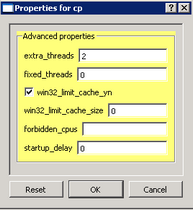
extra_threads (default: 2; range: 0 through 256)
Adds this many worker threads to the actor framework's automatic count. The automatic count also includes the framework's blocking actors and host CPU cores not reserved by another Avanti process. The resulting total must be between 1 and 256 and exceed the blocking-actor count; Avanti rejects a configuration outside these limits. This setting has no effect when fixed_threads is nonzero. Normally retain the default; changing the count can affect scheduling overhead and I/O responsiveness.
fixed_threads (default: 0; range: 0 through 256)
A nonzero value replaces the automatic calculation with exactly this many actor-framework worker threads. It must exceed the number of blocking device actors so at least one worker remains available for their handshakes. Zero selects the automatic calculation described for extra_threads. Normally retain zero unless troubleshooting a specific workload.
win32_limit_cache_yn (default: false)
False leaves the Windows system file-cache working-set limits unchanged. True applies the win32_limit_cache_size as a system-wide hard maximum while this Avanti process is running, then restores the prior limit state when it shuts down normally. This advanced compatibility option can help when sustained emulated-disk I/O causes the Windows file cache to consume enough memory to degrade system performance, but an unsuitable limit can itself reduce performance. Monitor the entire host when evaluating it.
Because the setting affects Windows globally rather than only Avanti, enable it in no more than one simultaneous Avanti process. Leave it false in every other Avanti configuration on that host.
win32_limit_cache_size (default: 0; increment: 128M)
When win32_limit_cache_yn is true, this value sets the system file-cache working-set maximum. Zero selects 25% of physical memory. A nonzero value must be a multiple of 128 MB; for example, 512M selects 512 MB. Start with zero, observe memory use and application performance under a representative workload, and change the value only when measurements justify it. If enabling the limiter makes performance worse, set win32_limit_cache_yn back to false.
forbidden_cpus
Reserves CPUs, blocking the emulator from using specific host CPU cores. Cores are numbered starting at zero (0). For example, a 4-core system has CPUs 0 – 3.
If blocking multiple CPUs, separate each CPU ID with a comma. An entry of 0,1 on a 4-core system would prevent Avanti from using CPU cores 0 and 1, effectively treating the machine as a 2-core system. Use unique unsigned decimal IDs; spaces around an ID or comma are allowed, but signs, other characters, empty entries, and duplicate IDs are rejected. A blank value excludes no CPUs. The configuration-file reader removes whitespace outside quoted strings, so an unquoted 1 2 is read as 12. Whitespace inside a quoted ID is retained and rejected; use commas to separate IDs. IDs must be within 0 through 255 and identify CPUs present on the host; this numeric limit does not expand the supported host topologies.
Note: This is a global setting that applies to all Avanti instances running on the host machine. It takes its value from the first emulator that is started, so every configuration used concurrently on one host should specify the same forbidden_cpus value.
cpu_core_preference (default: automatic)
Selects the preferred Windows CPU-core class for this emulator's Alpha-CPU thread. Use automatic or performance to prefer the highest available Windows efficiency class, or efficiency to prefer the lowest available class. Enter exactly automatic, performance, or efficiency in lowercase. If the preferred class is unavailable or exhausted, Avanti falls back through the remaining eligible classes instead of refusing startup. On supported Windows hosts that do not report efficiency classes, all three values retain physical-core and processor-topology ranking without a class preference.
This option is a placement hint within the CPUs already allowed by Windows process/job affinity and forbidden_cpus. It does not reserve a physical core from Windows or other applications and does not guarantee guest performance, host power use, or energy savings. Avanti still preserves a separate eligible I/O CPU for each instance, and the option does not change license-unit requirements.
startup_delay (default: 0)
Delays the emulated Alpha CPU start by this many whole seconds after Avanti has initialized and started its device framework. Zero starts the CPU without an intentional delay. This can sequence multiple separately launched Avanti processes or allow host resources to settle; it is not a readiness check for another service.
use_npcap_driver (default: true)
Selects the host packet-driver backend for every NIC in this Avanti process. True uses a compatible Npcap installation when available and falls back to the bundled Migration Specialties msipcap driver when Npcap cannot be loaded. False prevents subsequent Npcap loading and selects msipcap. Set this to false if Npcap is installed for another application but its license does not permit use by Avanti. When changing the value in the Configuration Utility, every NIC Interface list is refreshed for the selected backend; reselect any adapter shown as invalid. To opt out before the Configuration Utility first loads a default-true configuration, follow the text-editing procedure under PCAP Drivers. Avanti does not install Npcap or grant a license to use it.
