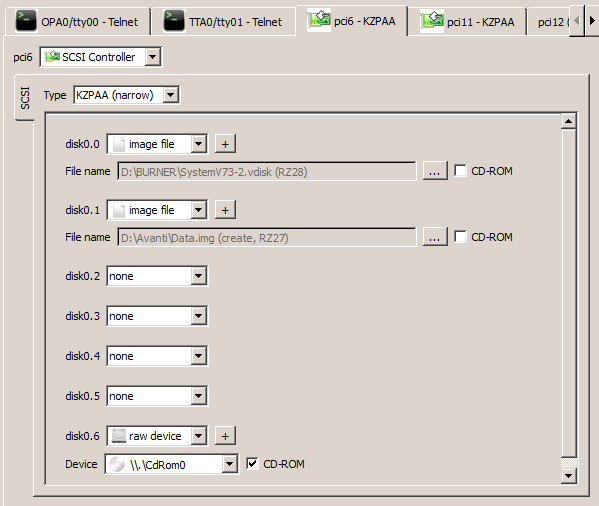
Avanti supports two types of SCSI controllers: the 7-target KZPAA narrow controller and the 15-target KZPCA wide controller. Up to three SCSI controllers can be defined in an Avanti configuration. The first controller is included in a zero-unit configuration regardless of whether it is a KZPAA or KZPCA; each additional controller requires license units.
Tip:The supported KZPCA matrix starts at OpenVMS V7.1-2 and Digital UNIX/Tru64 UNIX V4.0F. V4.0E has not been qualified for KZPCA. Use KZPAA with earlier or unqualified guest releases.
Type
Type allows the selection of the KZPAA (narrow) or KZPCA (wide) controller via a drop-down menu. When changing a KZPCA to KZPAA, the configuration utility warns if targets 8 through 15 are populated. Continuing removes those target definitions from the configuration; it does not delete their backing image files. Record their settings or move them to valid targets before accepting the change.
The current configuration utility does not expose a SCSI-controller [+] dialog. In a hand-edited configuration, the recognized legacy act_kzpca property must remain false; setting it to true does not convert a KZPAA and prevents the controller from starting. The debug property is a diagnostic-build hook and normally has no effect in a production build. Leave both properties at their false defaults.
In a hand-edited configuration, name each SCSI device disk<bus>.<target>, using complete unsigned decimal numbers and a lowercase disk prefix. Both controllers expose bus 0. KZPAA accepts targets 0 through 6; KZPCA accepts 0 through 6 and 8 through 15. ID 7 is reserved for the controller. Each address may contain only one file-backed disk, RAM disk, CD/DVD-ROM, tape image, or raw device. Leading zeroes retain their decimal meaning, so disk0.1 and disk00.01 are the same address and cannot coexist on one controller. The same target may be used on a different controller.
Malformed, overflowing, out-of-range, reserved, or duplicate SCSI addresses now prevent the configuration from loading. Correct the identifier or assign the duplicate device an unused supported target before restarting. Preserve each device's backing-file or raw-device settings; Avanti does not silently discard a duplicate device. Guest device names and boot selections may need updating after a target is changed. Existing license-unit rules are unchanged.
Disk0.n
Disk0.n displays the disk image file or raw device associated with a disk on the virtual Alpha. For example, the picture above depicts the following disk definitions.
Definition |
Virtual Alpha Device |
Image file or Raw Device |
File or Device String |
disk0.0 |
DKA0 |
Image |
D:\Avanti\System.img |
disk0.1 |
DKA100 |
Image |
D:\Avanti\Data.img |
disk0.6 |
DKA600 |
Raw |
\\.\CdRom0 |
Note: When using the KZPCA wide controller, disk numbering jumps from disk0.6 to disk0.8. This is normal and is due to the SCSI controller itself occupying slot 7.
