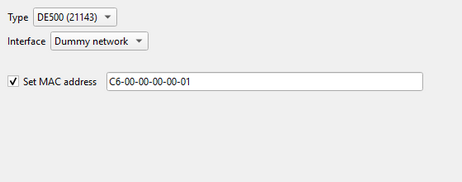
Avanti supports up to three NICs; the first two are included in a zero-unit configuration. NICs can be defined as the DE435 or the DE500 using the 21140 or 21143 chip sets. Networking Avanti discusses network configuration in more detail.
Tip: OpenVMS recognizes the DE435 and DE500 (21143) NIC types. The DE500 (21140) NIC type is only recognized by Digital UNIX/Tru64 UNIX.
Type
Type allows the user to choose between the following NIC types. DE435 selects the 21040 model; the two DE500 choices select the 21140 or 21143 model shown. Changing the type retains the other explicitly configured NIC settings.
NIC |
Recommended Usage |
DE435 |
•OpenVMS version 6.1-1H1 and higher. •Digital UNIX version 3.2C and later. |
DE500 (21140) |
•Digital UNIX/Tru64 UNIX version 4.0 through 4.0E. |
DE500 (21143) |
•OpenVMS version 7.2 and higher. •Digital UNIX/Tru64 UNIX version 4.0F and later. |
Interface
Avanti provides NIC interface options in a drop-down list:
Dummy network: Leaves the virtual NIC present in the emulated system but disconnected from any packet backend. Outbound packets are discarded and no packets are received. Each Dummy network NIC is independent; Dummy network does not connect virtual NICs to one another. This is useful for retaining an unused NIC in the guest configuration or as a placeholder before selecting a live network.
Host NIC: All host interfaces visible through the selected PCAP backend are displayed in the drop-down list. Selecting one connects this virtual NIC directly to that host interface. Make an explicit selection before starting the emulator; the configuration-file placeholder adapter = ask is replaced with the first enumerated interface when the Configuration Utility can do so. If a previously stored interface is unavailable, the utility retains it as an invalid selection so that you can choose a replacement.
Note:If a host adapter is added while Avanti or the Configuration Utility is running, close both programs and reopen the Configuration Utility to rescan. If it remains absent, follow Adding a Host NIC for backend-specific recovery.
Set MAC Address
Leave Set MAC address unchecked to let Avanti derive an address automatically. Checking it enables the MAC address field and stores a stable explicit address. Manually setting a MAC address is useful in the following situations:
•The generated MAC address causes a network conflict with another device.
•Software on the virtual Alpha system requires a specific MAC address.
•One host NIC is being shared between multiple Avanti instances.
•When running Avanti under Windows hosted on a virtual machine such as VMware.
Enter six two-digit hexadecimal octets in the form C6-00-00-xx-xx-xx. A colon can be used in place of each hyphen. The first octet must identify an individual rather than multicast address; C6 is a locally administered individual-address prefix. You are responsible for assigning a different complete address to every virtual NIC that can be active on the same network. Never run two instances concurrently with the same explicit address.
Note: The MAC address field will not accept an invalid MAC address. Trying to type or cut and paste an invalid MAC address will result in nothing being entered in the MAC address box.
For optional diagnostic counters, see NIC Configuration-File Settings. Host packet-driver selection is process-wide through use_npcap_driver in VLC [+].
