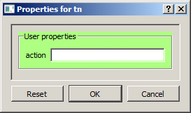
action (configuration-file default: empty)
The program and arguments used to launch a terminal during emulator initialization. An empty action launches nothing; it does not stop the listener. Specify the client address and port explicitly: Avanti does not append them to a custom command. Use only a trusted command, since opening an emulator configuration with a nonempty action launches that program when the emulator initializes. The complete command is limited to 999 bytes; a longer value is rejected rather than run in truncated form.
Tip: If running multiple instances of Avanti on a single host, don't forget to assign each virtual serial port a unique port number.
Checking Start session automatically writes a PuTTY command using the installed PuTTY path and the current port, replacing any existing action. For example, the action field might contain:
"C:\Program Files\Common Files\MigrationSpecialties Shared\putty.exe" telnet://127.0.0.1:9000
That path is illustrative; use the actual installed path. Quote a program path containing spaces. The action field contains the command itself, not an extra surrounding configuration-file string. When editing the configuration file instead, enclose the full value in quotes and double any embedded quotes, as in this example:
action = """C:\Program Files\Common Files\MigrationSpecialties Shared\putty.exe"" telnet://127.0.0.1:9000";
After accepting a custom nonempty action, Start session automatically is shown checked. Clearing that checkbox erases the command; checking it again restores the generated PuTTY command, not the former custom command. After changing Port, check a custom action yourself: the utility replaces occurrences of a colon followed by the old port number, but does not understand arbitrary client command-line syntax.
allow_remote (default: false)
This Advanced setting controls the listener address, independently of action. False listens only on 127.0.0.1; true listens on all IPv4 interfaces. Review the access and security implications in Telnet Server before enabling it.
